Nobody Told You SharePoint Could Do THIS
Your SharePoint document library is one of the most visited places on your intranet — and for most organisations it looks exactly like it did ten years ago. In this video I showed you how to completely transform it using JSON view formatting— custom file type icons, category-driven colours, and a dynamic filter panel. No Power Automate. No code. Just JSON doing things most people have no idea it can do.
This post is here to give you the JSON files so you can grab them and start experimenting straight away.
⚙️ How to Apply the Formatting
If you've never used JSON view formatting before, here's the quick version:
1. Switch your library or list to Gallery view
2. Click the view dropdown → Format current view
3. In the right panel, scroll down and click Advanced mode
4. Paste the JSON → Preview → Save
💡 The full walkthrough — including the web part connection setup and the FileCategory badge column formatter — is in the video above.
🗂️ JSON 1 — File Type Icons
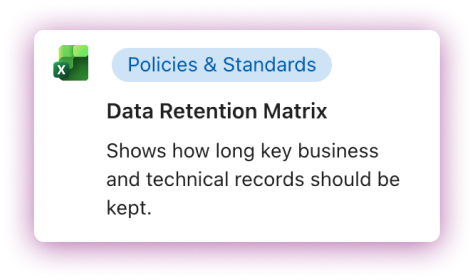
File Type Icons used for this example
Apply this to your document library's gallery view. It reads the built-in file extension field and swaps in a matching custom icon for each file type.
📌 Important! Replace [your-tenant-domain] with your tenant domain! Check the URL of your site in the browser address bar to find this. Also, replace all image URLs (the long https://... paths in the "src" field) with the URLs of your own icons stored in Site Assets.
{
  "$schema": "https://developer.microsoft.com/json-schemas/sp/v2/tile-formatting.schema.json",
  "height": 165,
  "width": 284,
  "hideSelection": false,
  "fillHorizontally": false,
  "formatter": {
    "elmType": "div",
    "attributes": {
      "class": "sp-card-container"
    },
    "children": [
      {
        "elmType": "div",
        "attributes": {
          "class": "sp-card-defaultClickButton"
        },
        "customRowAction": {
          "action": "defaultClick"
        }
      },
      {
        "elmType": "div",
        "attributes": {
          "class": "ms-bgColor-white sp-css-borderColor-neutralLight sp-card-borderHighlight sp-card-subContainer"
        },
        "children": [
          {
            "elmType": "div",
            "style": {
              "display": "flex",
              "align-items": "flex-start",
              "padding-top": "8px",
              "padding-left": "8px",
              "padding-right": "8px"
            },
            "children": [
              {
                "elmType": "img",
                "attributes": {
                  "src": "=if([$File_x0020_Type] == 'docx','https://[your-tenant-domain].sharepoint.com/sites/A365-Custom-Doc-Cards/SiteAssets/FileTypes/Word-Logo.png',if([$File_x0020_Type] == 'xlsx','https://[your-tenant-domain].sharepoint.com/sites/A365-Custom-Doc-Cards/FileTypes/Excel-Logo.png',if([$File_x0020_Type] == 'pdf','https://[your-tenant-domain].sharepoint.com/sites/A365-Custom-Doc-Cards/FileTypes/PDF-Logo.png',if([$File_x0020_Type] == 'pbix','https://[your-tenant-domain].sharepoint.com/sites/A365-Custom-Doc-Cards/FileTypes/PowerBi-Logo.png',if([$File_x0020_Type] == 'pptx','https://[your-tenant-domain].sharepoint.com/sites/A365-Custom-Doc-Cards/FileTypes/Powerpoint-Logo.png',if([$File_x0020_Type] == 'drawio','https://[your-tenant-domain].sharepoint.com/sites/A365-Custom-Doc-Cards/FileTypes/Drawio-Logo.png',if([$File_x0020_Type] == 'jpg','https://[your-tenant-domain].sharepoint.com/sites/A365-Custom-Doc-Cards/FileTypes/Image-Logo.png',if([$File_x0020_Type] == 'png','https://[your-tenant-domain].sharepoint.com/sites/A365-Custom-Doc-Cards/FileTypes/Image-Logo.png',if([$File_x0020_Type] == 'mov','https://[your-tenant-domain].sharepoint.com/sites/A365-Custom-Doc-Cards/FileTypes/MOV-Logo.png',if([$File_x0020_Type] == 'mp4','https://[your-tenant-domain].sharepoint.com/sites/A365-Custom-Doc-Cards/FileTypes/MP4-Logo.png','https://[your-tenant-domain].sharepoint.com/sites/A365-Custom-Doc-Cards/FileTypes/Unknown-Logo.png')))))))))",
                  "alt": "File type"
                },
                "style": {
                  "width": "25px",
                  "height": "25px",
                  "margin-right": "12px",
                  "margin-top": "2px",
                  "flex-shrink": "0"
                }
              },
              {
                "elmType": "div",
                "style": {
                  "display": "flex",
                  "flex-direction": "column",
                  "flex-grow": "1",
                  "min-width": "0"
                },
                "children": [
                  {
                    "elmType": "div",
                    "style": {
                      "margin-bottom": "6px"
                    },
                    "children": [
                      {
                        "elmType": "div",
                        "attributes": {
                          "class": "sp-card-content sp-card-formatterRef"
                        },
                        "children": [
                          {
                            "columnFormatterReference": "[$FileCategory]"
                          }
                        ]
                      }
                    ]
                  },
                  {
                    "elmType": "p",
                    "attributes": {
                      "title": "[$Title]",
                      "class": "ms-fontColor-neutralPrimary sp-card-content sp-card-highlightedContent",
                      "role": "heading",
                      "aria-level": "3"
                    },
                    "txtContent": "=if([$Title] == '', '–', [$Title])",
                    "style": {
                      "font-weight": "600",
                      "margin": "0 0 8px 0",
                      "white-space": "normal",
                      "word-break": "break-word",
                      "display": "-webkit-box",
                      "-webkit-line-clamp": "2",
                      "-webkit-box-orient": "vertical",
                      "overflow": "hidden"
                    }
                  },
                  {
                    "elmType": "p",
                    "attributes": {
                      "title": "[$DocDescription]",
                      "class": "ms-fontColor-neutralPrimary sp-card-content sp-card-multiline"
                    },
                    "txtContent": "=if([$DocDescription] == '', '–', [$DocDescription])",
                    "style": {
                      "margin": "0",
                      "white-space": "normal",
                      "word-break": "keep-all",
                      "display": "-webkit-box",
                      "-webkit-line-clamp": "3",
                      "-webkit-box-orient": "vertical",
                      "overflow": "hidden",
                      "height": "60px"
                    }
                  }
                ]
              }
            ]
          }
        ]
      }
    ]
  }
}
🏷️ JSON 2 — Category Icons
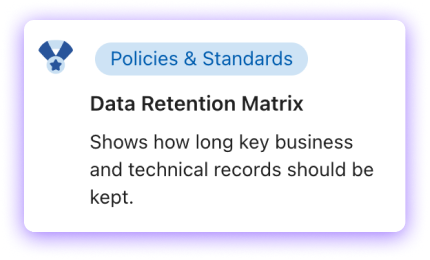
Same card structure as above, but this version reads your FileCategory choice column instead of the file extension. Each category gets its own icon.
In the video I used four categories: Policies & Standards, Architecture & Design, Project Delivery, and Support & How-To. Update the category names and icon URLs to match your own setup.
📌Replace the category names and all image URLs to match your own categories and icons.
{
  "$schema": "https://developer.microsoft.com/json-schemas/sp/v2/tile-formatting.schema.json",
  "height": 165,
  "width": 284,
  "hideSelection": false,
  "fillHorizontally": false,
  "formatter": {
    "elmType": "div",
    "attributes": {
      "class": "sp-card-container"
    },
    "children": [
      {
        "elmType": "div",
        "attributes": {
          "class": "sp-card-defaultClickButton"
        },
        "customRowAction": {
          "action": "defaultClick"
        }
      },
      {
        "elmType": "div",
        "attributes": {
          "class": "ms-bgColor-white sp-css-borderColor-neutralLight sp-card-borderHighlight sp-card-subContainer"
        },
        "children": [
          {
            "elmType": "div",
            "style": {
              "display": "flex",
              "align-items": "flex-start",
              "padding-top": "8px",
              "padding-left": "8px",
              "padding-right": "8px"
            },
            "children": [
              {
                "elmType": "img",
                "attributes": {
                  "src": "=if([$FileCategory] == 'Policies & Standards','https://[your-tenant-domain].sharepoint.com/sites/A365-Custom-Doc-Cards/CategoryIcons/PoliciesStandards.png',if([$FileCategory] == 'Support & How-To','https://[your-tenant-domain].sharepoint.com/sites/A365-Custom-Doc-Cards/CategoryIcons/Support.png',if([$FileCategory] == 'Architecture & Design','https://[your-tenant-domain].sharepoint.com/sites/A365-Custom-Doc-Cards/CategoryIcons/ArchDesign.png',if([$FileCategory] == 'Project Delivery','https://[your-tenant-domain].sharepoint.com/sites/A365-Custom-Doc-Cards/CategoryIcons/ProjDel.png','https://[your-tenant-domain].sharepoint.com/sites/A365-Custom-Doc-Cards/FileTypes/Unknown-Logo.png'))))",
                  "alt": "File type"
                },
                "style": {
                  "width": "25px",
                  "height": "25px",
                  "margin-right": "12px",
                  "margin-top": "2px",
                  "flex-shrink": "0"
                }
              },
              {
                "elmType": "div",
                "style": {
                  "display": "flex",
                  "flex-direction": "column",
                  "flex-grow": "1",
                  "min-width": "0"
                },
                "children": [
                  {
                    "elmType": "div",
                    "style": {
                      "margin-bottom": "6px"
                    },
                    "children": [
                      {
                        "elmType": "div",
                        "attributes": {
                          "class": "sp-card-content sp-card-formatterRef"
                        },
                        "children": [
                          {
                            "columnFormatterReference": "[$FileCategory]"
                          }
                        ]
                      }
                    ]
                  },
                  {
                    "elmType": "p",
                    "attributes": {
                      "title": "[$Title]",
                      "class": "ms-fontColor-neutralPrimary sp-card-content sp-card-highlightedContent",
                      "role": "heading",
                      "aria-level": "3"
                    },
                    "txtContent": "=if([$Title] == '', '–', [$Title])",
                    "style": {
                      "font-weight": "600",
                      "margin": "0 0 8px 0",
                      "white-space": "normal",
                      "word-break": "break-word",
                      "display": "-webkit-box",
                      "-webkit-line-clamp": "2",
                      "-webkit-box-orient": "vertical",
                      "overflow": "hidden"
                    }
                  },
                  {
                    "elmType": "p",
                    "attributes": {
                      "title": "[$DocDescription]",
                      "class": "ms-fontColor-neutralPrimary sp-card-content sp-card-multiline"
                    },
                    "txtContent": "=if([$DocDescription] == '', '–', [$DocDescription])",
                    "style": {
                      "margin": "0",
                      "white-space": "normal",
                      "word-break": "keep-all",
                      "display": "-webkit-box",
                      "-webkit-line-clamp": "3",
                      "-webkit-box-orient": "vertical",
                      "overflow": "hidden",
                      "height": "60px"
                    }
                  }
                ]
              }
            ]
          }
        ]
      }
    ]
  }
}
🔍 JSON 3 — Category Filter Panel
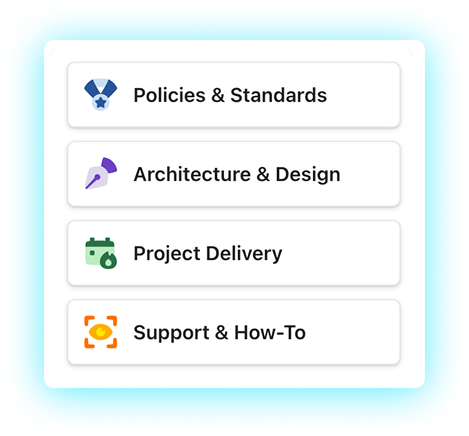
This one goes on your separate Categories list, not the document library. It formats each list item as a compact card showing the category icon and name.
The key trick here is removing the defaultClick behaviour — so clicking a card triggers the web part filter connection instead of navigating to the list item. That's what gives you one-click filtering with zero Power Automate.
📌 Make sure the Title field values in your Categories list exactly match the category names in your FileCategory column — the filter connection depends on them being identical.
{
  "$schema": "https://developer.microsoft.com/json-schemas/sp/v2/tile-formatting.schema.json",
  "height": 60,
  "width": 254,
  "hideSelection": false,
  "fillHorizontally": true,
  "formatter": {
    "elmType": "div",
    "attributes": {
      "class": "sp-card-container"
    },
    "children": [
      {
        "elmType": "div",
        "attributes": {
          "class": "ms-bgColor-white sp-css-borderColor-neutralLight sp-card-borderHighlight sp-card-subContainer"
        },
        "children": [
          {
            "elmType": "div",
            "style": {
              "display": "flex",
              "align-items": "center",
              "padding-left": "12px",
              "padding-right": "12px",
              "height": "100%"
            },
            "children": [
              {
                "elmType": "img",
                "attributes": {
                  "src": "=if([$Title] == 'Policies & Standards','https://[your-tenant-domain].sharepoint.com/sites/A365-Custom-Doc-Cards/CategoryIcons/PoliciesStandards.png',if([$Title] == 'Architecture & Design','https://[your-tenant-domain].sharepoint.com/sites/A365-Custom-Doc-Cards/CategoryIcons/ArchDesign.png',if([$Title] == 'Support & How-To','https://[your-tenant-domain].sharepoint.com/sites/A365-Custom-Doc-Cards/CategoryIcons/Support.png',if([$Title] == 'Project Delivery','https://[your-tenant-domain].sharepoint.com/sites/A365-Custom-Doc-Cards/CategoryIcons/ProjDel.png','https://[your-tenant-domain].sharepoint.com/sites/A365-Custom-Doc-Cards/FileTypes/Unknown-Logo.png'))))",
                  "alt": "Category icon",
                  "title": "[$Title]"
                },
                "style": {
                  "width": "25px",
                  "height": "25px",
                  "margin-right": "12px",
                  "flex-shrink": "0"
                }
              },
              {
                "elmType": "p",
                "attributes": {
                  "title": "[$Title]",
                  "class": "ms-fontColor-neutralPrimary sp-card-content sp-card-highlightedContent",
                  "role": "heading",
                  "aria-level": "3"
                },
                "txtContent": "=if([$Title] == '', '–', [$Title])",
                "style": {
                  "margin": "0",
                  "padding": "0"
                }
              }
            ]
          }
        ]
      }
    ]
  }
}
🎨 JSON 3 — Category Background Colours
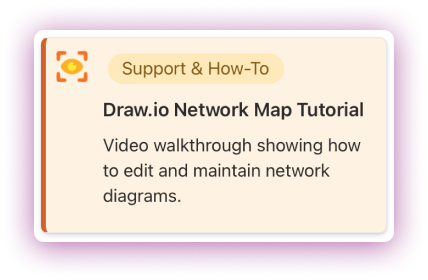
This version adds colour-coded card backgrounds and a left-border accent so each category is instantly recognisable at a glance without even reading the label.
The colour pairings from the video:
• Policies & Standards — Blue (#eef5ff background, #2b6cb0 border)
• Architecture & Design — Purple (#f3eaff background, #805ad5 border)
• Project Delivery — Green (#e9f7ef background, #2f855a border)
• Support & How-To — Amber (#fff4e5 background, #dd6b20 border)
💡Swap the hex colours to match your brand palette. Category names and image URLs need replacing as usual.
{
  "$schema": "https://developer.microsoft.com/json-schemas/sp/v2/tile-formatting.schema.json",
  "height": 165,
  "width": 284,
  "hideSelection": false,
  "fillHorizontally": false,
  "formatter": {
    "elmType": "div",
    "attributes": {
      "class": "sp-card-container"
    },
    "children": [
      {
        "elmType": "div",
        "attributes": {
          "class": "sp-card-defaultClickButton"
        },
        "customRowAction": {
          "action": "defaultClick"
        }
      },
      {
        "elmType": "div",
        "attributes": {
          "class": "ms-bgColor-white sp-css-borderColor-neutralLight sp-card-borderHighlight sp-card-subContainer"
        },
        "style": {
          "background-color": "=if([$FileCategory] == 'Policies & Standards','#eef5ff',if([$FileCategory] == 'Architecture & Design','#f3eaff',if([$FileCategory] == 'Project Delivery','#e9f7ef',if([$FileCategory] == 'Support & How-To','#fff4e5','#ffffff'))))",
          "border-left": "=if([$FileCategory] == 'Policies & Standards','4px solid #2b6cb0',if([$FileCategory] == 'Architecture & Design','4px solid #805ad5',if([$FileCategory] == 'Project Delivery','4px solid #2f855a',if([$FileCategory] == 'Support & How-To','4px solid #dd6b20','4px solid #d0d0d0'))))",
          "transition": "all 0.15s ease"
        },
        "children": [
          {
            "elmType": "div",
            "style": {
              "display": "flex",
              "align-items": "flex-start",
              "padding-top": "8px",
              "padding-left": "8px",
              "padding-right": "8px"
            },
            "children": [
              {
                "elmType": "img",
                "attributes": {
                  "src": "=if([$FileCategory] == 'Policies & Standards','https://[your-tenant-domain].sharepoint.com/sites/A365-Custom-Doc-Cards/CategoryIcons/PoliciesStandards.png',if([$FileCategory] == 'Architecture & Design','https://[your-tenant-domain].sharepoint.com/sites/A365-Custom-Doc-Cards/CategoryIcons/ArchDesign.png',if([$FileCategory] == 'Support & How-To','https://[your-tenant-domain].sharepoint.com/sites/A365-Custom-Doc-Cards/CategoryIcons/Support.png',if([$FileCategory] == 'Project Delivery','https://[your-tenant-domain].sharepoint.com/sites/A365-Custom-Doc-Cards/CategoryIcons/ProjDel.png','https://[your-tenant-domain].sharepoint.com/sites/A365-Custom-Doc-Cards/FileTypes/Unknown-Logo.png'))))",
                  "alt": "File type"
                },
                "style": {
                  "width": "25px",
                  "height": "25px",
                  "margin-right": "12px",
                  "margin-top": "2px",
                  "flex-shrink": "0"
                }
              },
              {
                "elmType": "div",
                "style": {
                  "display": "flex",
                  "flex-direction": "column",
                  "flex-grow": "1",
                  "min-width": "0"
                },
                "children": [
                  {
                    "elmType": "div",
                    "style": {
                      "margin-bottom": "6px"
                    },
                    "children": [
                      {
                        "elmType": "div",
                        "attributes": {
                          "class": "sp-card-content sp-card-formatterRef"
                        },
                        "children": [
                          {
                            "columnFormatterReference": "[$FileCategory]"
                          }
                        ]
                      }
                    ]
                  },
                  {
                    "elmType": "p",
                    "attributes": {
                      "title": "[$Title]",
                      "class": "ms-fontColor-neutralPrimary sp-card-content sp-card-highlightedContent",
                      "role": "heading",
                      "aria-level": "3"
                    },
                    "txtContent": "=if([$Title] == '', '–', [$Title])",
                    "style": {
                      "font-weight": "600",
                      "margin": "0 0 8px 0",
                      "white-space": "normal",
                      "word-break": "break-word",
                      "display": "-webkit-box",
                      "-webkit-line-clamp": "2",
                      "-webkit-box-orient": "vertical",
                      "overflow": "hidden"
                    }
                  },
                  {
                    "elmType": "p",
                    "attributes": {
                      "title": "[$DocDescription]",
                      "class": "ms-fontColor-neutralPrimary sp-card-content sp-card-multiline"
                    },
                    "txtContent": "=if([$DocDescription] == '', '–', [$DocDescription])",
                    "style": {
                      "margin": "0",
                      "white-space": "normal",
                      "word-break": "keep-all",
                      "display": "-webkit-box",
                      "-webkit-line-clamp": "3",
                      "-webkit-box-orient": "vertical",
                      "overflow": "hidden",
                      "height": "60px"
                    }
                  }
                ]
              }
            ]
          }
        ]
      }
    ]
  }
}